
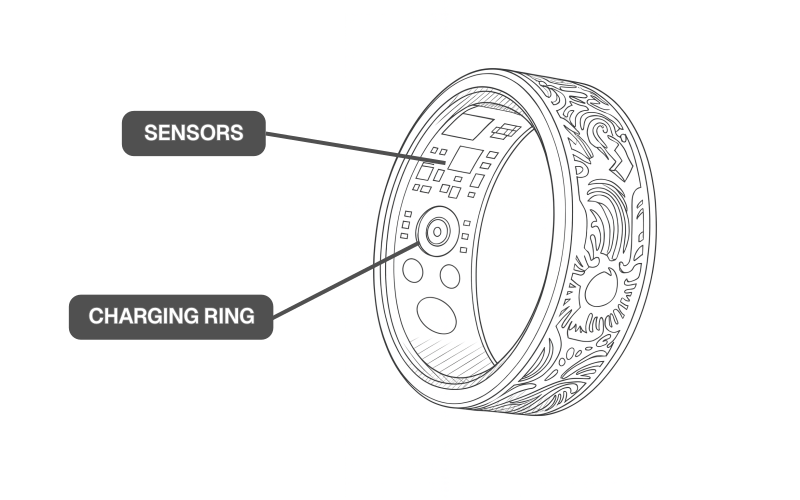

Important: Wear your Bionic Ring with the sensors facing the palm of your hand.
Importante: Portez votre anneau Bionic Ring de façon à ce que ses capteurs se trouvent du côté de la paume.
Wichtig: Tragen Sie Ihren Bionic Ring so, dass die Sensoren zu Ihrer Handfläche zeigen.
Importante: Lleva puesto tu anillo biónico con los sensores orientados hacia la palma de tu mano.
重要的: 佩戴仿生戒指時,請確保感應器朝向手掌。
Sleep is not tracking
My sleep didn’t record. What should I check?
Confirm the ring fits snugly and the sensor sits palm-side on the finger pad. Loose or rotated rings miss signals.
Which finger works best for sleep?
Index or middle finger—stable fit, stronger signals. Check it is in correct position on finger before bed.
Do I need to enable anything?
Make sure sleep tracking is turned on in the app and the ring has sync/data permissions.
Could battery or sync be the issue?
Yes. Charge above 30%, keep Bluetooth on, and open the app to sync after you wake.
Why did it stop tracking during the night?
Rotation, light leak, or intermittent skin contact. Re-check fit and avoid stacking rings next to it.
Any pre-bed tips?
Align palm-side, dry your hands, and wear the ring alone on that finger for consistent contact.
How to wear the Bionic Ring properly
Where should the sensor sit?
Palm side, centered on the finger pad for the cleanest signals.
Which finger is best?
Index or middle finger. Prioritize stability over tradition.
How tight is “right”?
Snug, not squeezed. If it spins or lifts when you swing your hand, it’s too loose.
How do I stop rotation?
Correct size + palm-side alignment. If your fingers shrink in cold/dry weather, consider a half size down.
Daily sizing changes?
Fingers vary through the day. Pick the finger that stays most consistent for you.
Quick fit check
Minimal rotation, no visible light leak, sensor aligned palm-side.
Still need help?
Please don’t hesitate to contact us at support@airguard.ai
Have a question?
Get in touch.